
Wednesday, November 2, 2011
2011 US Payroll Year End Update
The 2011 U.S. Payroll Year-End Update is scheduled to be released Mid-November. This update will include table changes to the following:
- W2 form changes
- W3 form changes
- EFW2 Electronic Filing
- 1099-R Payroll Pension form changes
- 1099-DIV alignment changes
- Fixed Assets Luxury Auto Maximum Depreciation Deduction Amounts
Links
If you have any questions or need help installing the Year End Update, please contact support@collinscomputing.com.NOTE: Microsoft will provide a 2012 Year-End Update to all 10 customers for U.S. and Canada. Microsoft will also provide Round 1 U.S. Tax tables for the 2013 Payroll reporting year. There will be no additional updates released after the 2013 Round 1 tax update, normal technical support for GP 10 will end on 10/10/2017. If you are using Dynamics GP version 10 you must update to Microsoft Dynamics GP 2010 or Microsoft Dynamics GP 12 (Due to release in December 2012) to receive any further regulatory updates after the January 2013 Round 1 Tax Update.

Wednesday, October 12, 2011
Need Additional Storage for HR and Payroll Information?
Use the Employee Extra Fields Window! The following types of information can be stored in the Employee Extra Fields window.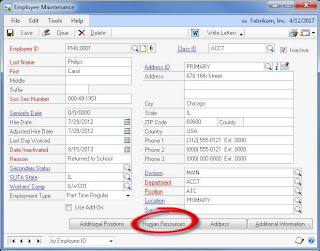
- Dates (5 fields)
- Numeric (5 fields)
- Alpha/Numeric (5 lines with 30 characters in each line)
- Currency (5 fields)
- Checkboxes (5 custom categories)
In order to access the Employee Extra Fields window, we start with the Employee Maintenance window and click on the ‘Human Resources’ button.

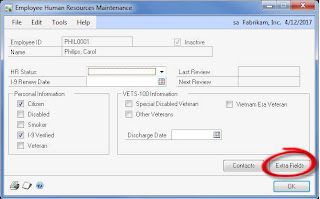
This takes us to the Employee Human Resources Maintenance window, where we then click on the ‘Extra Fields’ button.

You are now at the Employee Extra Fields window.
The example below shows how we have this window set up at the company. Use the first date field as the 401(k) plan eligibility date. Also use the checkboxes for termination reasons and the alpha/numeric section for any termination explanation.

And now the important part – how do we customize this window?
You can get to the Extra Fields Setup window a couple of different ways.
- Drop-down menu method: Choose Microsoft Dynamics GP Tools Setup Human Resources Extra Fields Employee
- Home Page method: Go to the HR & Payroll home page, expand the Setup section, expand the Human Resources and Extra Fields sections, click on Employee
The Extra Fields Setup window shows the five different sections that are customizable. All you have to do is type the text you want to show up as the label in each section.

Do you need a report with this data? The data is located in the HR_Employee_Extra table.
Subscribe to:
Comments (Atom)


